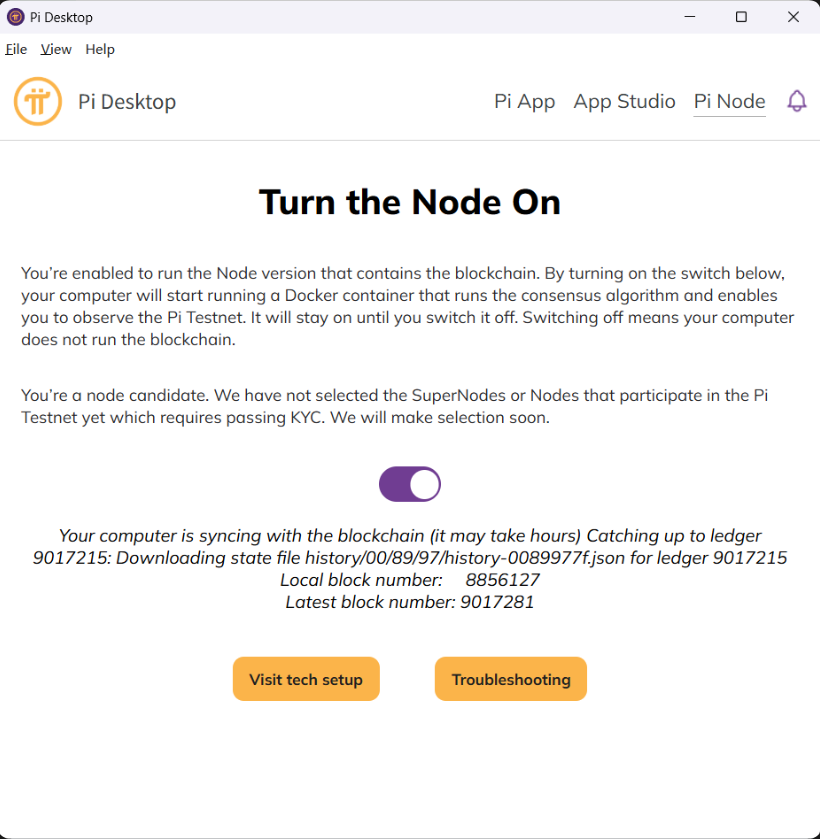
- peer 连接正常:已经有 8 个 authenticated peers
- 本地区块仍卡在:8856127
- 状态卡在:Downloading state file history/00/89/97/history-0089977f.json
真正的错误在 /tmp/stellar-core.log:
curl … https://history.temp.testnet2.minepi.com//history/00/89/97/history-0089977f.json …
exited 60
SSL certificate problem: certificate has expired
Missing HAS for ledger 9017215
也就是说:主 stellar-core 配置正在访问 history.temp.testnet2.minepi.com,但这个地址的 HTTPS 证书校验失败,导致历史状态文件下载不了,所以 Local block number 不动。
另一个地址:
- https://history.temp.testnet2.minepi.com/...:失败,证书有问题
- https://history.testnet2.minepi.com/...:成功,HTTP 200,文件能下载
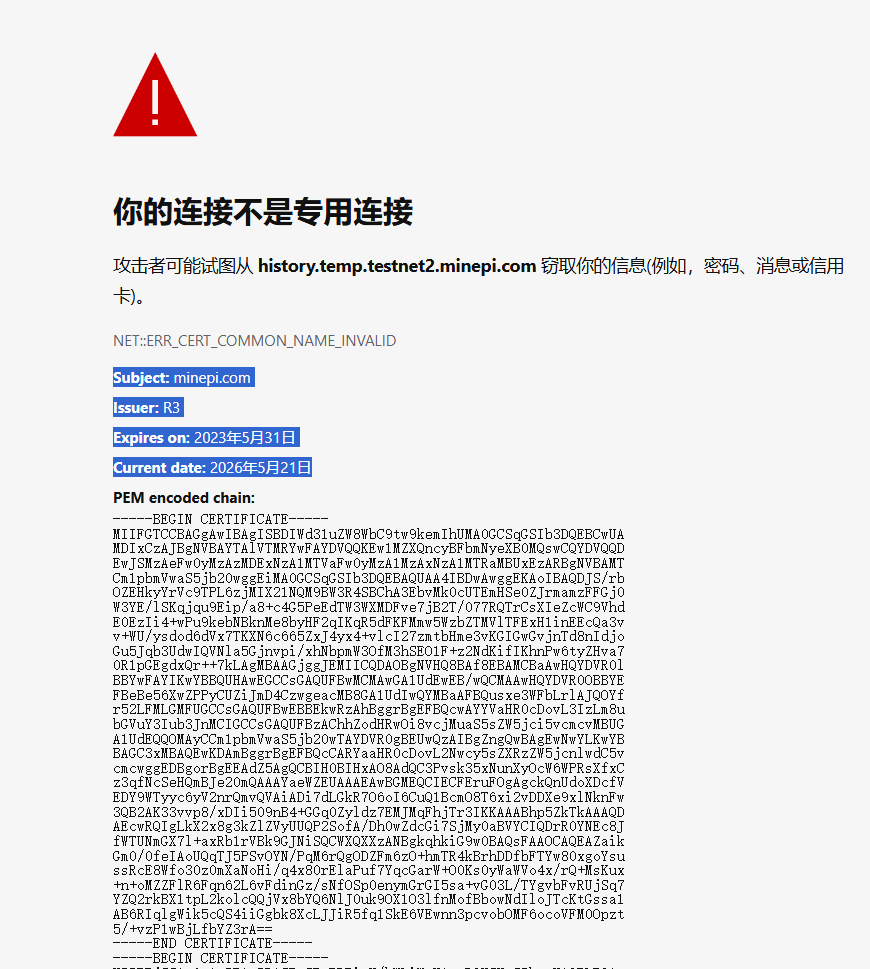
真,草台班子。。。。。。
临时修复办法(重启电脑可能失效):
运行powershell(管理员)
1. 先确认容器名
docker ps --format "table {{.Names}}\t{{.Status}}\t{{.Image}}" | findstr testnet这里容器名应该是 testnet2。
2. 备份配置
docker exec testnet2 sh -lc 'cp -a /opt/stellar/core/etc/stellar-core.cfg /opt/stellar/core/etc/stellar-core.cfg.bak-$(date +%Y%m%d-%H%M%S)'3. 查看当前 history 源
docker exec testnet2 sh -lc 'grep -n "HISTORY=" /opt/stellar/core/etc/stellar-core.cfg'应该会看到类似:
HISTORY="curl -sf https://history.temp.testnet2.minepi.com//{0} -o {1}"4. 执行替换
docker exec testnet2 sh -c "sed -i 's|https://history.temp.testnet2.minepi.com//|https://history.testnet2.minepi.com/|g' /opt/stellar/core/etc/stellar-core.cfg"再执行这一条,兜底处理单斜杠情况:
docker exec testnet2 sh -c "sed -i 's|https://history.temp.testnet2.minepi.com/|https://history.testnet2.minepi.com/|g' /opt/stellar/core/etc/stellar-core.cfg"5. 确认替换成功
docker exec testnet2 sh -c "grep -n 'HISTORY=' /opt/stellar/core/etc/stellar-core.cfg"应该看到三行都变成:
HISTORY="curl -sf https://history.testnet2.minepi.com/{0} -o {1}"6. 重启 Pi 的 stellar-core
docker exec testnet2 supervisorctl restart stellar-core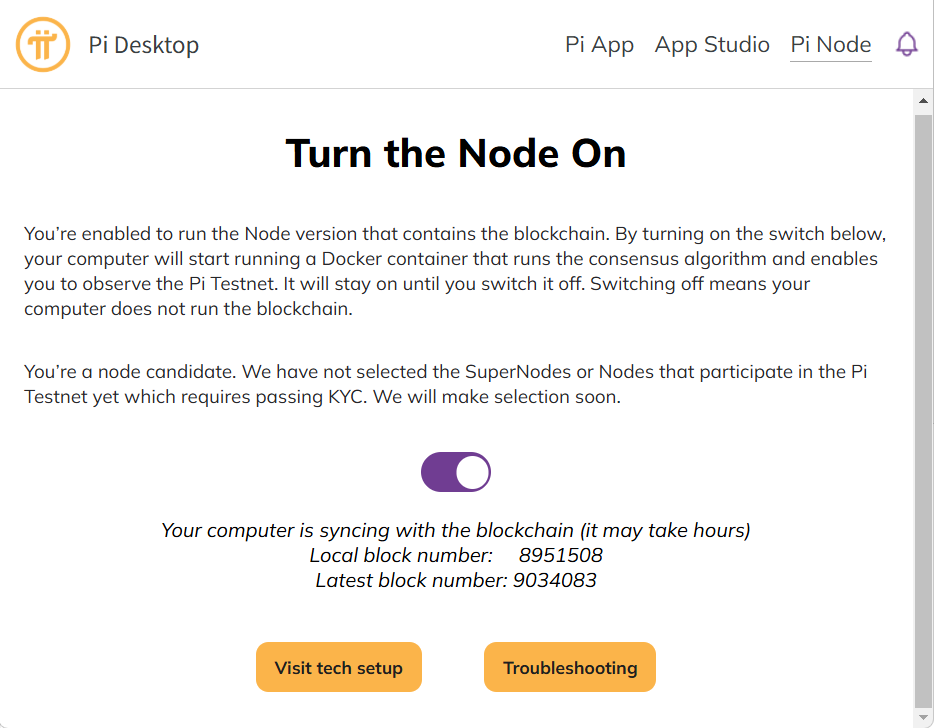
恢复同步。
我自己电脑重启后又被恢复成了 https://history.temp.testnet2.minepi.com/
所以做一个 Windows 计划任务,每隔5分钟检查一次;如果发现被改回 temp,就自动替换并重启 stellar-core。
1. 先创建自动修复脚本
注意要把:$script = "C:\Documents\Fix-PiNodeHistory.ps1"
C:\Documents 这里改成你自己实际存在的路径
1. 先创建自动修复脚本 和 3. 注册计划任务,自动保持 这两步的路径都要改成一样的
在 PowerShell 里执行:
$script = "C:\Documents\Fix-PiNodeHistory.ps1"

@'
$container = "testnet2"
$cfg = "/opt/stellar/core/etc/stellar-core.cfg"
$goodHistory = "https://history.testnet2.minepi.com/{0} -o {1}"
$badPatterns = @(
    "history.temp.testnet2.minepi.com",
    "https://https://history.testnet2.minepi.com",
    "https://history.testnet2.minepi.com//"
)

$running = docker inspect -f "{{.State.Running}}" $container 2>$null
if ($LASTEXITCODE -ne 0 -or $running.Trim() -ne "true") { exit 0 }

$before = docker exec $container sh -c "grep -n 'HISTORY=' '$cfg'" 2>$null
if ($LASTEXITCODE -ne 0 -or [string]::IsNullOrWhiteSpace($before)) { exit 0 }

$needsFix = $false
foreach ($pattern in $badPatterns) {
    if ($before -match [regex]::Escape($pattern)) {
        $needsFix = $true
        break
    }
}

if (-not $needsFix) { exit 0 }

$stamp = Get-Date -Format "yyyyMMdd-HHmmss"

docker exec $container sh -c "cp -a '$cfg' '$cfg.autofix-bak-$stamp'"
docker exec $container sh -c "sed -i 's|https://https://history.testnet2.minepi.com//|https://history.testnet2.minepi.com/|g' '$cfg'"
docker exec $container sh -c "sed -i 's|https://https://history.testnet2.minepi.com/|https://history.testnet2.minepi.com/|g' '$cfg'"
docker exec $container sh -c "sed -i 's|https://history.temp.testnet2.minepi.com//|https://history.testnet2.minepi.com/|g' '$cfg'"
docker exec $container sh -c "sed -i 's|https://history.temp.testnet2.minepi.com/|https://history.testnet2.minepi.com/|g' '$cfg'"
docker exec $container sh -c "sed -i 's|https://history.testnet2.minepi.com//|https://history.testnet2.minepi.com/|g' '$cfg'"

$after = docker exec $container sh -c "grep -n 'HISTORY=' '$cfg'" 2>$null

foreach ($pattern in $badPatterns) {
    if ($after -match [regex]::Escape($pattern)) {
        Write-Error "Patch failed: invalid history URL still present"
        exit 1
    }
}

if ($after -notmatch [regex]::Escape($goodHistory)) {
    Write-Error "Patch failed: expected history URL was not found"
    exit 1
}

if ($after -ne $before) {
    docker exec $container supervisorctl restart stellar-core
}
'@ | Set-Content -Encoding UTF8 $script
2. 先手动跑一次
powershell.exe -NoProfile -ExecutionPolicy Bypass -File "C:\Documents\Fix-PiNodeHistory.ps1"确认:
docker exec testnet2 sh -c "grep -n 'HISTORY=' /opt/stellar/core/etc/stellar-core.cfg"应该看到三行都是:
https://history.testnet2.minepi.com/{0}3. 注册计划任务,自动保持
$script = "C:\Documents\Fix-PiNodeHistory.ps1"

$action = New-ScheduledTaskAction -Execute "powershell.exe" -Argument "-NoProfile -ExecutionPolicy Bypass -File `"$script`""
$trigger1 = New-ScheduledTaskTrigger -AtLogOn
$trigger2 = New-ScheduledTaskTrigger -Once -At (Get-Date).AddMinutes(1) -RepetitionInterval (New-TimeSpan -Minutes 5) -RepetitionDuration (New-TimeSpan -Days 3650)
$settings = New-ScheduledTaskSettingsSet -StartWhenAvailable -AllowStartIfOnBatteries -DontStopIfGoingOnBatteries

Register-ScheduledTask -TaskName "PiNodeHistoryFix" -Action $action -Trigger @($trigger1, $trigger2) -Settings $settings -Description "Auto patch Pi Node testnet2 history archive URL." -Force
这样以后 Pi Desktop/Docker 重启后,即使它又写回 history.temp...,最多几分钟内会被自动改回正常源。
等 Pi Desktop 官方证书问题解决后,可以停掉这个计划任务。
删除这个自动任务用:
Unregister-ScheduledTask -TaskName "PiNodeHistoryFix" -Confirm:$false
最后,其实也不用修,不影响收益 ,真草台班子 🤣🤣🤣
想问下博主的网站用的什么WP主题呀 俺也想搭建一个做笔记
WordPress 7.0,使用 Dashscroll 主题。https://agnarson.com/wpthemes/ 作者的主题都不错
感谢