这次迁移用buyvm瑞士机房抗投诉vps做反代,又增加了好多知识点,好记性不如烂笔头,记录一下备忘。
新服务器:
参照原有服务器安装基础环境,设置只允许反代服务访问80、443端口,关闭不必要的端口。
按正常步骤建立网站,绑定域名,不需要开启ssl。
docker容器只开放本地端口。
反代服务器:
使用 buyvm 瑞士机房 CH RYZEN KVM 2GB VPS
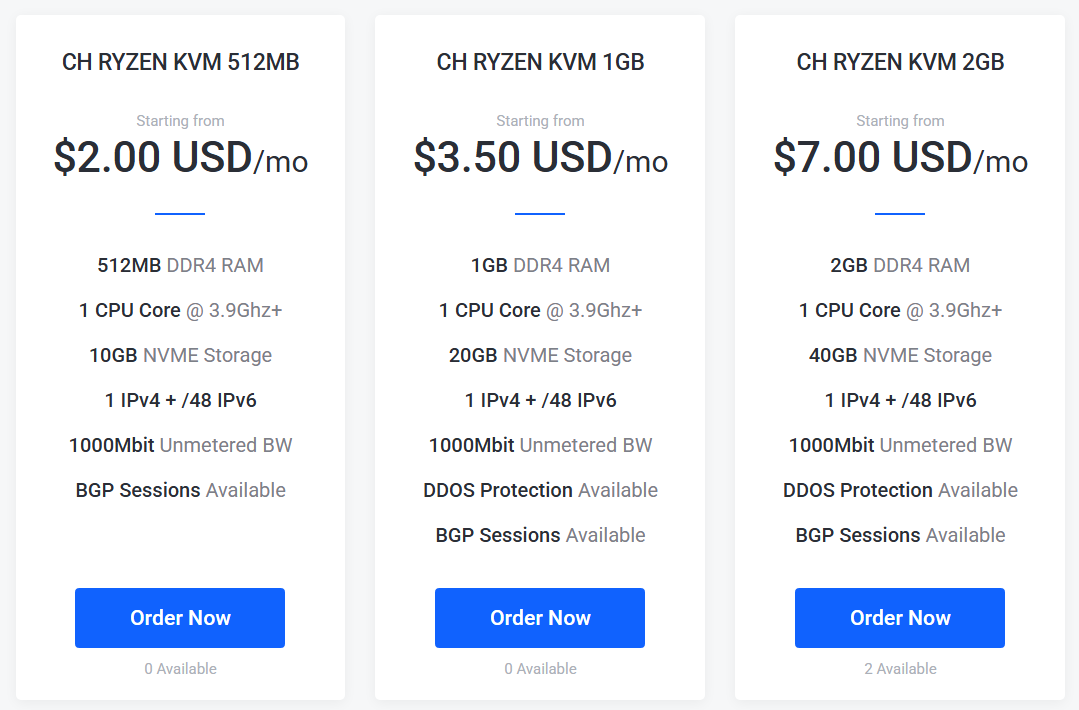
只做反代的话1GB配置也够用,但是一直没货,一般凌晨两三点钟补货,欢迎使用我的aff购买:https://my.frantech.ca/aff.php?aff=7804
解析域名到反代服务器IP。
添加反代项目,设置与源站相同的域名,Target 到 http://源站ip:80
Send Host设置为:$host,申请ssl证书。
可在 /www/server/panel/vhost/nginx 目录下直接编辑nginx配置文件。
站点配置:
猫盘解析:nginx配置网站运行目录为:public
alist云盘菜单中填写新的域名和令牌,令牌位置:openlist 设置 - 其他 - 令牌。
如果alist、openlist 更改了域名需要在数据库中把以前生成的链接地址进行替换。
openlist:docker-compose.yml
services:
  openlist:
    image: 'openlistteam/openlist:latest'
    container_name: openlist
    #user: '1001:1001' #sudo chown -R 1001:1001 /www/wwwroot/docker/openlist
    volumes:
      - './data:/opt/openlist/data'
    ports:
      - '127.0.0.1:5244:5244'
    environment:
      - UMASK=022
    restart: unless-stopped
新建网站并添加反代到 http://127.0.0.1:5244
pansou、umami打包后直接启动容器,umami添加反代 。
苹果cms站点:
清洗规则文件目录迁移到反代机,在nginx中设置在反代机运行清洗规则。
location = /api/***.php {
    try_files $uri =404;
    include fastcgi_params;
    fastcgi_param SCRIPT_FILENAME $document_root$fastcgi_script_name;
    fastcgi_pass unix:/tmp/php-cgi-74.sock;
}
测速逻辑迁移到反代机运行。
location = /api/***.php {
    try_files $uri =404;
    include fastcgi_params;
    fastcgi_param SCRIPT_FILENAME $document_root$fastcgi_script_name;
    fastcgi_pass unix:/tmp/php-cgi-74.sock;
}
跳板机nginx中增加源站和反代站的ip地址。
    # =======================
    # 单独的 pipe.php 入口
    # =======================
    location = /pipe.php {
        # 只允许IP
        allow 源站IP;
        allow 反代IP;
        deny  all;
        # 载入 FastCGI 标准参数(如 QUERY_STRING、REQUEST_METHOD 等)
        include        fastcgi_params;

        # 把 PHP 实际文件路径传给 PHP-FPM(显式指定,否则可能 404)
        # $document_root 是 server{} 里的 root;$fastcgi_script_name 是请求的脚本路径
        fastcgi_param  SCRIPT_FILENAME  $document_root$fastcgi_script_name;

        # 选择对接 PHP-FPM 的方式(二选一):
        fastcgi_pass   unix:/tmp/php-cgi-74.sock;   # ← 使用 Unix Socket(推荐,低开销)
        # fastcgi_pass  127.0.0.1:9000;             # ← 使用 TCP 端口(若 FPM 用端口监听)

        # 关闭 FastCGI 层的响应缓冲 —— 让后端边算边发,减少内存占用/延迟
        fastcgi_buffering off;

        # 与 PHP-FPM 的连接/读写超时(防止卡死占住 worker)
        fastcgi_connect_timeout 3s;   # 连接 FPM 最多等 3 秒
        fastcgi_read_timeout  25s;    # 读取 FPM 响应最多等 25 秒
        fastcgi_send_timeout  25s;    # 向 FPM 发送请求体最多等 25 秒
    }

    # ============================================
    # 探测速接口:/probe.php(短任务,超时更紧)
    # ============================================
    location = /probe.php {
        # 只允许IP
        allow 源站IP;
        allow 反代IP;
        deny  all;
        # 基于“令牌桶”的 QPS 限制:
        #   - zone=probe_rps   :使用 http{} 顶层定义的共享内存区
        #   - burst=10          :瞬间最多允许超额 10 次(桶可欠 10 个令牌)
        #   - nodelay          :有桶就立刻放行;无桶直接 429(不排队排等)
        limit_req  zone=probe_rps  burst=10 nodelay;

        # 并发连接限制(基于 IP 计数),需要 http{} 有 limit_conn_zone
        #   - 每个来源 IP 对该 location 同时最多 2 个活跃连接
        limit_conn perip_conn 10;

        # 只处理明确存在的物理文件(防止误打到别的脚本)—按需要可启用
        # try_files $uri =404;

        # FastCGI 标准参数与 PHP 文件路径
        include        fastcgi_params;
        fastcgi_param  SCRIPT_FILENAME  $document_root$fastcgi_script_name;

        # 对接 PHP-FPM(与上面保持一致)
        fastcgi_pass   unix:/tmp/php-cgi-74.sock;  # 或 127.0.0.1:9000

        # 由于 /probe.php 是短流程,超时设置稍紧,避免长时间占用 worker
        fastcgi_connect_timeout 3s;
        fastcgi_read_timeout   20s;
        fastcgi_send_timeout   20s;

        # 当被限流/超并发时的返回码(便于前端识别/重试/backoff)
        limit_req_status 429;
        limit_conn_status 429;
    }

    # ====================================================
    # 探测速接口:/player_probe.php(可能较长,超时更宽)
    #   - 这一路一般会拉起 Node/Chromium(Puppeteer)做浏览器级探测
    #   - 因此 FPM 执行耗时可能更久,超时适当拉长
    # ====================================================
    location = /player_probe.php {
        # 只允许IP
        allow 源站IP;
        allow 反代IP;
        deny  all;
        # 与 /probe.php 一样的速率限制与并发限制
        limit_req  zone=probe_rps  burst=10 nodelay;
        limit_conn perip_conn 10;

        # 只处理明确存在的物理文件(可选)
        # try_files $uri =404;

        include        fastcgi_params;
        fastcgi_param  SCRIPT_FILENAME  $document_root$fastcgi_script_name;
        fastcgi_pass   unix:/tmp/php-cgi-74.sock;  # 或 127.0.0.1:9000

        # 给 Browser/Node 探测留更充裕的时间;但仍要有上限,防护卡死
        fastcgi_connect_timeout 5s;
        fastcgi_read_timeout   120s;   # 读响应最长 40 秒
        fastcgi_send_timeout   120s;

        limit_req_status 429;
        limit_conn_status 429;
    }
自定义404页面
# 1) 内部 404 页面:从源站取模板
location = /__Err_404 {
    internal;
    proxy_intercept_errors off;
    proxy_pass http://源站IP:80/label/404.html;

    proxy_set_header Host $host;
    proxy_set_header X-Real-IP $remote_addr;
    proxy_set_header X-Forwarded-For $proxy_add_x_forwarded_for;
    proxy_set_header X-Forwarded-Proto $scheme;

    add_header Cache-Control "no-store" always;
}

# 2) 影片详情页:拦截源站 404 -> 换成 /__Err_404(状态码仍保持 404)
location ^~ /voddetail/ {
    proxy_pass http://源站IP:80;

    proxy_set_header Host $host;
    proxy_set_header X-Real-IP $remote_addr;
    proxy_set_header X-Forwarded-For $proxy_add_x_forwarded_for;
    proxy_set_header X-Forwarded-Proto $scheme;

    proxy_http_version 1.1;
    proxy_set_header Upgrade $http_upgrade;
    proxy_set_header Connection "upgrade";

    proxy_intercept_errors on;
    error_page 404 =404 /__Err_404;

    # 防止 404 被缓存导致“第一次/第二次不一致”
    add_header Cache-Control "no-store" always;
    proxy_no_cache 1;
    proxy_cache_bypass 1;
}

# 播放页(可选)
location ^~ /vodplay/ {
    proxy_pass http://源站IP:80;

    proxy_set_header Host $host;
    proxy_set_header X-Real-IP $remote_addr;
    proxy_set_header X-Forwarded-For $proxy_add_x_forwarded_for;
    proxy_set_header X-Forwarded-Proto $scheme;

    proxy_http_version 1.1;
    proxy_set_header Upgrade $http_upgrade;
    proxy_set_header Connection "upgrade";

    proxy_intercept_errors on;
    error_page 404 =404 /__Err_404;

    add_header Cache-Control "no-store" always;
    proxy_no_cache 1;
    proxy_cache_bypass 1;
}
追更提醒:在源站添加新的Vod Worker 服务,参考 苹果cms 增强收藏和追剧提醒功能 - N把刀 7.1 systemd 服务单元
HSTS - 修改/www/server/panel/vhost/nginx下域名对应的配置文件:
加入新的server块,HTTP 一律 301 到 HTTPS(不加 HSTS)
server {
    listen 80;
    server_name ***.com www.***.com;
    return 301 https://***.com$request_uri;
}

HTTPS - 主站(只在这里加一次 HSTS)
add_header Strict-Transport-Security "max-age=63072000; includeSubDomains; preload" always;

验证地址:
https://hstspreload.org/
https://myssl.com/
最终落地架构
- 反代机负责对外 HTTPS、HSTS、80→443 跳转、局部 PHP 截获执行(清洗/测速)
- 源站只作为核心业务上游(HTTP 80),负责业务逻辑、模板 404 guard、追更 worker
- 测速最终放在反代机跑,避免源站 ↔ 跳板机网络不通导致全站测速失效
- 跳板机只允许源站/反代 IP 访问 probe/pipe,并配置限流与超时防护
猫盘解析还能用啊?
能用
用那个储存好
联通、移动,其他的没测试
大佬,最新的苹果v10会容易出现挂马吗
这个不好说吧,如果源码、主题来源没有问题,服务器再收紧一些权限,通常没啥事